


Does Anyone Have Epson Cx7450 All In One Printer?
Decorating By Pghnana Updated 26 Aug 2008 , 2:03am by suzyqqq27


Go to this website and go to the second page it should give you the info you want I think it will work the the information should tel you more.
Molly
http://www.kopykake.com/documents/PrinterInks-Xref.pdf
Here is another thread that talks about the same printer.
http://forum.cakecentral.com/cake-decorating-ftopict-598972.html

I have this printer. It is a scanner, printer and copier. I use the scanner a lot and it seems to work well for the edible images...so far. I've only done about 10-15 so far on it. I have no complaints so far. It constantly tells me that I"m out of ink when I'm really not but I just tell it to continue and that's fine. At first it was sucking in the paper really fast and I was afraid that it would break them, however, I realized that if I change the setting to "photo" or "best photo" that it doesn't do this and it pulls the paper in nice and slowly. I certainly paid more than $29 and I think that's a steal.
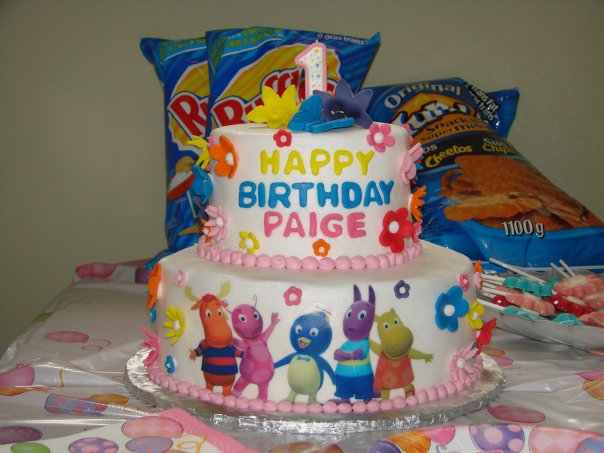
See the attached picture, the Backyardigans are an edible image done on my Epson - I think the colour is even better than my Canon - but to be fair, I had a cheap Canon.
Hope this helps,
Suzanne

I saw this too, I think someone else posted about it, and so now I think I'm going to at least get the printer even if I can't buy the ink and other supplies just it. Glad to hear it works well!
I bought the printer 'cause I couldn't pass up that great price. Now I'm on the hunt for the ink. I see at Kopykake the set is $72. Is this an average price or is there a better deal elsewhere? Also, are frosting sheets different from rice paper or wafer paper? I did a cake for my grandson's birthday last year with an edible image I bought online and it was like eating paper. I even put the image on several days before the party and it was still like paper.

I have the Epson CX5000 (all in one) It works great for the edible images. I did have a sheet jam once, but was able to get it out with a lot of patience! The colors are pretty good, except I can never get the red to come out really red! I comes out more of a brown/red. I hadn't used it for at least 2 months and the other night decided to run a sheet through it just to make sure the ink hadn't dried up. It printed perfectly!
BTW - suzyqqq227, the colors on your image came out great! What a cute cake.
Yah, I was happy with the colours on this one - my Canon colours never turned out quite so nicely. I too used the Premium Presentation Matte Paper setting and chose Best Photo for quality. It uses more ink but the pictures are better and what I like best is that it doesn't yank the paper into the machine - that always makes my heart skip a beat thinking I'll be picking out little pieces of frosting from the printer if it breaks.
Thanks for the compliment,
Suzanne
Quote by @%username% on %date%
%body%